

Local AI is becoming an experience choice
For years, artificial intelligence mostly felt like a destination somewhere else. A person opened a browser, sent a request to the cloud, and waited for an answer.
Local AI changes that relationship. A model can now run on a laptop, gaming PC, workstation, mini computer, or private server. The prompt, the processing, and the response can remain close to the person using the system.
That creates meaningful possibilities: private document work, offline assistance, predictable repeated use, faster experimentation, and experiences designed around a specific person or organization.
The honest tradeoff
More control also means more responsibility
I must choose the model, understand the license, fit it into memory, select the runtime, protect the data, test the output, maintain the software, and explain the limitations. Local does not mean effortless. It means I own more of the experience.
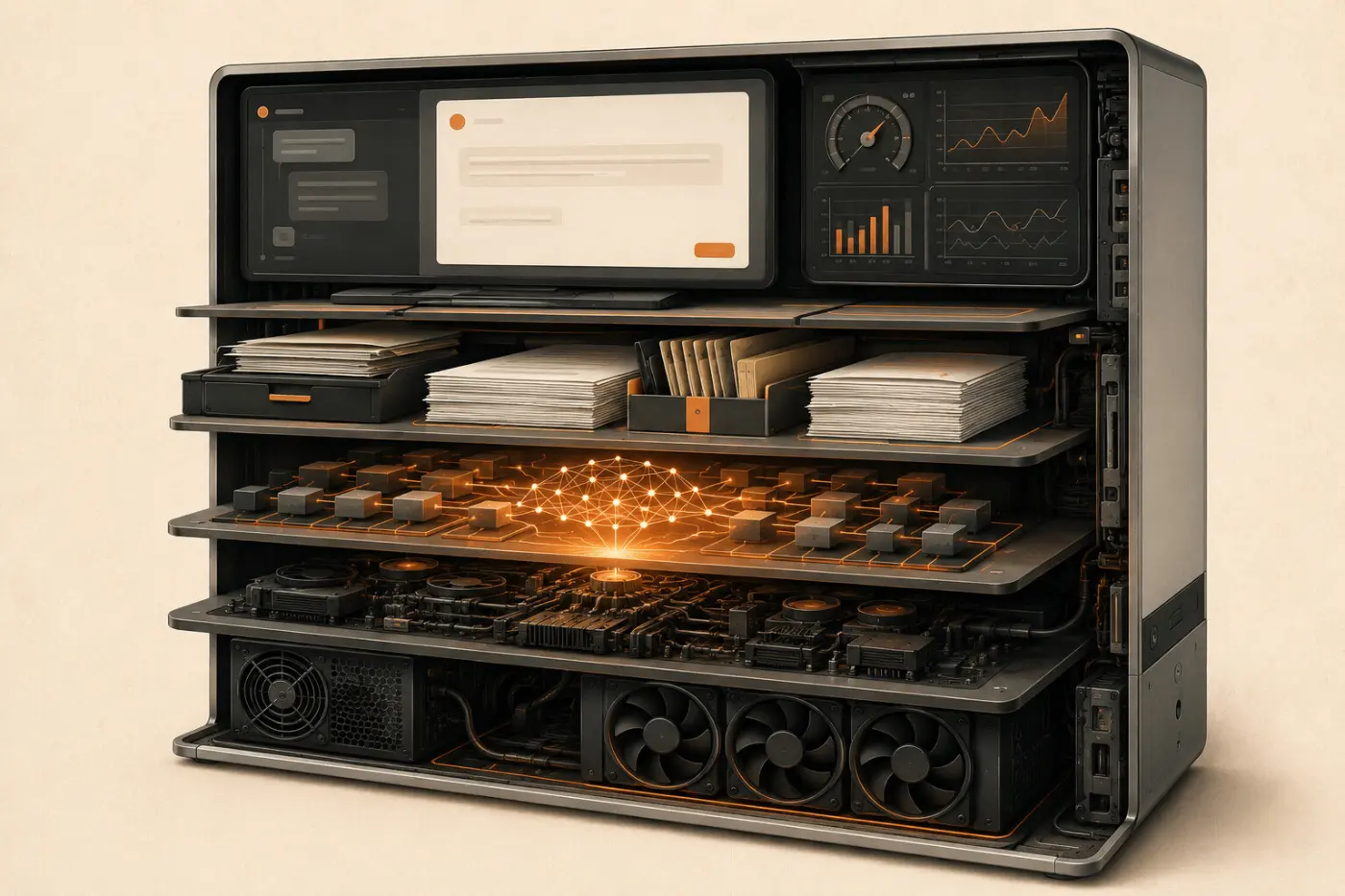
The model is only one layer
People often talk about local AI as if downloading a model completes the system. It does not.
A dependable local AI experience is a stack. The hardware provides the physical capacity. Drivers help the software use that capacity. A runtime loads and executes the model. The model produces the answer. An interface helps a person interact with it. A workflow connects that answer to a useful job. Evaluation tells me whether the job was done well.
I think of this like a restaurant. The model is the chef, but the experience also depends on the kitchen, ingredients, menu, service, cleanliness, and the way the meal is judged. A talented chef in a kitchen that cannot support the work will not create a dependable result.
Projects such as llama.cpp made efficient local inference widely accessible across different hardware. Tools such as Ollama simplified model management and local APIs. These are important building blocks. The customer, however, experiences the whole system—not the name of the runtime.
Start with the job, not the leaderboard
The first question I ask is not, “Which model is best?” I ask, “What must this experience do?”
Summarizing a meeting, answering questions from private product documents, writing code, analyzing an image, generating a structured response, and controlling tools are different jobs. Each job has a different tolerance for delay, mistakes, memory use, and complexity.
A leaderboard is useful for creating a shortlist. It cannot reproduce my hardware, prompts, documents, workflow, security rules, or customer expectations.
The final test
Workflow fit
Workflow fit is the match between the model, hardware, runtime, prompt, and recurring job. This is like fitting a shoe: the most expensive shoe in the store is still the wrong choice if it does not fit the person walking in it.

The smallest capable model often creates the best experience
Model size is commonly described in parameters. Parameters are the values learned during training. This is like the number of adjustable connections inside a very large map. More connections can support more capability, but they also require more room and energy.
I do not begin by forcing the largest model onto the machine. I begin with the smallest model that may meet the quality target, then test upward only when the evidence shows a gap.
This approach improves more than speed. A smaller model can load faster, use less memory, consume less power, leave capacity for other parts of the workflow, and make the experience available across more computers.
Quantization stores model values with lower precision. This is like packing a winter coat into a vacuum bag: it is still the same coat, but it needs less suitcase space. Compression can make a model practical on local hardware, but aggressive compression may also reduce quality.
The correct question is not whether a model can technically load. It is whether it can complete the real task at the required quality, speed, and stability.
Memory is the room where the model works
Local AI depends heavily on memory.
VRAM is memory attached to a discrete graphics processor. Unified memory is a shared pool used by the processor and graphics system on some computers. System RAM can also hold model data, although moving work away from the fastest accelerator may reduce performance.
I think of memory as a workshop. The model, the prompt, the conversation history, and the working data all need space on the benches. If the workshop is too small, materials spill into another room and every step takes longer.
Context length—the amount of text and conversation the model can consider—also consumes memory. A model may fit comfortably with a short prompt and struggle with a long report. This is why a model-size number alone does not describe the real experience.
Storage matters too. Ollama’s official Windows documentation notes that models may require tens or even hundreds of gigabytes. Experiments can quietly leave behind duplicate models, older quantizations, indexes, containers, and logs. Maintenance is part of the product.
Privacy is an outcome, not a location
Privacy is one of the strongest reasons to use local AI. It is also one of the easiest promises to oversimplify.
A model running on a local computer does not automatically guarantee that every part of the workflow stays private. An application may store conversations. A document interface may keep indexes or logs. A service may be exposed to the network. A downloaded model or container may come from an untrusted source.
I verify privacy as an end-to-end behavior. I check where the documents are stored, what the application logs, whether telemetry is active, which accounts have access, whether the service is reachable from outside the intended network, and whether the workflow still functions when disconnected where offline operation is required.
Local agents deserve even more care. An agent combines a model with tools such as files, browsers, applications, or commands. This is like giving an assistant both a desk and a ring of keys. The assistant may be inside the building, but the permissions still determine what can happen.
Safe expansion
Begin with narrow authority
I begin local agents with narrow, read-only access. I require approval for destructive actions, keep backups, log important steps, and expand authority only after reliability is demonstrated.
Test the experience people will actually use
A successful first prompt proves only that the model can generate text.
I create a repeatable prompt pack based on real customer work. For document analysis, I use known reports and questions with verifiable answers. For coding, I use representative tasks and run the result. For structured output, I require valid JSON and parse it. For retrieval-augmented generation, I verify that the right documents were retrieved and that citations actually support the answer.
Retrieval-augmented generation, or RAG, supplies relevant documents at answer time. This is like allowing the model to open the correct pages of a reference binder before responding. If the answer is wrong, the problem may be extraction, chunking, retrieval, instructions, or the model itself.
I measure time to first token—the pause before the model begins answering—along with total completion time, generation speed, memory use, stability, and answer quality.
I also test failure. What happens when the document is too large? When the model does not know? When memory is insufficient? When the network is disconnected? When the software is updated?
An experience becomes trustworthy when it behaves understandably under pressure, not only when the demonstration goes well.
Hybrid AI is often the most honest answer
Local and cloud AI should not be treated as opposing beliefs.
Some work belongs locally because it is private, repetitive, latency-sensitive, or needed offline. Some work belongs in the cloud because it requires frontier reasoning, enormous context, specialized multimodal capability, or temporary access to hardware that would be wasteful to own.
A hybrid design uses each environment deliberately. This is like having a capable kitchen at home and still choosing a specialized restaurant for an exceptional meal.
The experience should make that choice visible. A person should understand when information stays on the device, when it may leave, why a different model is being used, and what control remains.
The goal is not to prove that every task can run locally. The goal is to place each task where it creates the most value with the least unnecessary risk.
Local AI should disappear into the work
I know a local AI system is maturing when the conversation stops being about model files and starts being about the experience.
Does the private assistant help someone find the right answer? Does the coding model reduce effort without introducing hidden defects? Does the document workflow provide traceable evidence? Does the system work on the customer’s actual hardware? Can the organization maintain it after the demonstration?
Those questions move local AI from experimentation to engineering.
The most impressive local system is not the one with the largest model collection or the loudest hardware. It is the one that regular users can understand, trust, and relate to—a system where advanced technology becomes simple enough to serve a real human purpose.
That is the standard I use: not whether the model runs, but whether the complete experience works.
Takeaways
What I keep
- Begin with the recurring job and its pass-or-fail definition.
- Treat the model as one layer in a complete local AI stack.
- Choose the smallest model that consistently meets the quality target.
- Plan memory, context, storage, power, and maintenance together.
- Verify privacy through the entire workflow, not only the model location.
- Test real prompts, evidence, failures, and updates repeatedly.
- Use hybrid AI when it produces a better balance of value, capability, and risk.